
Educational Use Cases – Teaching Urdu with Nastaleeq Web Pro
Introduction
Urdu language education faces a unique challenge in the digital age. Teachers and students need materials that are clear, readable, and professionally presented. Yet, for years, educators have struggled with broken fonts, inconsistent rendering, and the technical complexity of creating Urdu learning resources. Worksheets that look perfect on a teacher’s laptop appear misaligned on a student’s device. Homework assignments lose their formatting when shared online. The beauty of the Nastaleeq script – so essential to Urdu’s cultural identity – is lost in a sea of jagged, disconnected letters.
As we explored in our introductory post, Nastaleeq Web Pro was built to solve these exact problems. In this eighteenth post of our launch series, I will focus specifically on how educators, teachers, and students benefit from our Urdu typography tool.
By the end of this post, you will understand how Nastaleeq Web Pro can transform Urdu language education, why teachers trust it for classroom materials, and how you can use it to create beautiful, effective learning resources.
The Unique Challenges of Urdu Language Education
Before explaining the benefits, let me outline the specific challenges that Urdu teachers and students face daily.
Challenge 1: Inconsistent Font Rendering in Learning Materials
As we detailed in our post about the struggle of writing Urdu online, Urdu text often looks different on different devices. A worksheet created on a Windows computer may appear broken on a student’s Chromebook or iPad. This inconsistency creates confusion and frustration for young learners.
Challenge 2: Limited Font Options for Different Age Groups
A font that works well for adults may be inappropriate for children. Young learners need larger, clearer fonts with simple letterforms. Advanced students may benefit from more authentic Nastaleeq fonts. Most educational tools offer only one generic option.
As we showcased in our font exploration post, Nastaleeq Web Pro offers twenty carefully curated fonts, including options specifically suited for educational contexts.
Challenge 3: Technical Complexity for Teachers
Teachers are educators, not web developers. They should not need to learn HTML, CSS, or font licensing to create worksheets and assignments. Yet, most Urdu typing tools require technical knowledge that many teachers simply do not have.
Challenge 4: Privacy Concerns for Student Work
Student assignments, grades, and personal information are sensitive. Uploading student work to external servers is often prohibited by school policies. Teachers need tools that process everything locally.
Challenge 5: No Live Preview for Lesson Planning
Without a live preview, teachers cannot see how their materials will appear to students before distributing them. This publish-and-pray cycle wastes time and undermines confidence.
As we emphasized in our beginner’s guide, Nastaleeq Web Pro addresses every single one of these challenges.
Why Nastaleeq Web Pro is the Best Choice for Urdu Education
Let me walk you through the specific reasons why Nastaleeq Web Pro outperforms every alternative for Urdu language education.
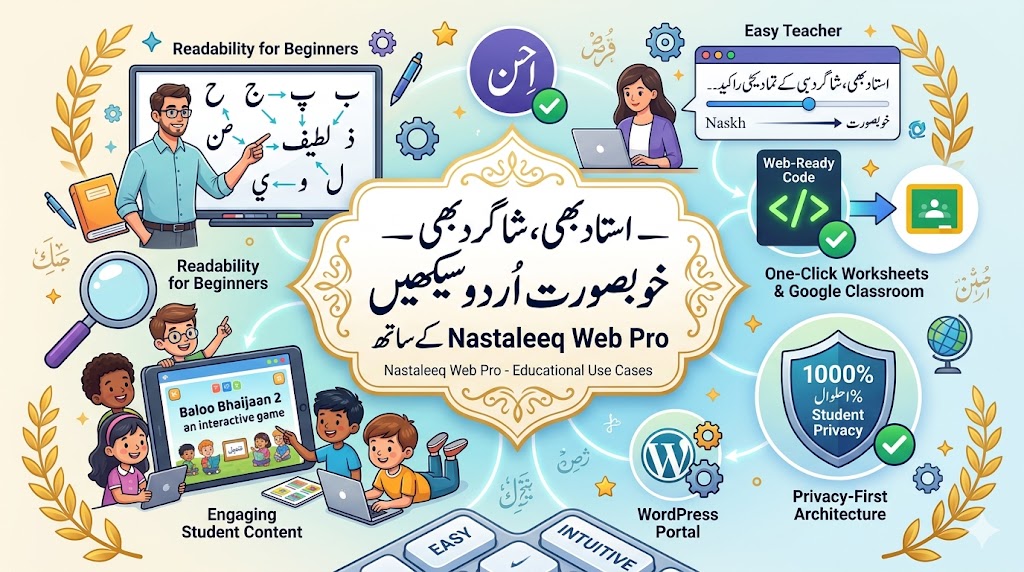
Benefit 1: Fonts Designed for Readability and Learning
Nastaleeq Web Pro offers twenty carefully curated fonts, including options specifically chosen for educational contexts.
For teachers, this means:
-
Jameel Noori Nastaleeq Kasheeda – Extended spacing between letters, perfect for young readers
-
Lateef – Clean, simple Naskh font ideal for beginners
-
Harmattan – Minimal decorative elements, prioritizes clarity
-
Baloo Bhaijaan 2 – Playful, friendly font perfect for children’s content
These fonts make it easier for students to recognize letters, understand connections, and develop reading fluency.
Benefit 2: Large Font Sizes for Young Learners
As we explained in our font size and weight guide, Nastaleeq Web Pro gives you a font size slider ranging from 16 to 72 pixels in 1px increments.
For teachers, this means:
-
Create worksheets with 36px or 48px text for early readers
-
Use 24-28px for standard classroom materials
-
Make flashcards with 52px+ text for vocabulary drills
-
Ensure all students can read clearly, regardless of visual ability
Benefit 3: One-Click Web-Ready Code for Worksheets
Nastaleeq Web Pro generates clean, inline-styled HTML and CSS with a single click. This code preserves all your font selections, size adjustments, and weight preferences.
For teachers, this means:
-
Create worksheets once and share them across any platform
-
Paste into learning management systems (Canvas, Moodle, Google Classroom)
-
Email assignments directly to parents
-
No reformatting needed for different devices
As detailed in our web-ready code guide, this feature is a game-changer for educators who need consistent, reliable materials.
Benefit 4: Privacy-First Architecture for Student Work
Nastaleeq Web Pro processes everything client-side. Student text never leaves their browsers. Teacher materials never touch external servers.
For teachers and schools, this means:
-
Compliance with student privacy laws (FERPA, GDPR)
-
No risk of data breaches or unauthorized access
-
Student assignments remain confidential
-
No need for IT approval or security reviews
As we emphasized in our free version guide, privacy is not a feature – it is a right. Nastaleeq Web Pro respects that right completely.
Benefit 5: Real-Time Live Preview for Lesson Planning
Nastaleeq Web Pro features a real-time live preview that updates instantly as you type, select fonts, adjust sizes, and change weights.
For teachers, this means:
-
See exactly how worksheets will appear before printing or sharing
-
Test different fonts to find the most readable option
-
Adjust spacing and alignment for clarity
-
No wasted paper or time on trial-and-error printing
Benefit 6: No Account, No Installation, No Barriers
Nastaleeq Web Pro requires no account, no installation, and no technical knowledge. Teachers can start creating materials immediately.
For schools, this means:
-
No IT support required
-
No software licenses to purchase
-
Works on any device with a web browser
-
Teachers can use it from home or classroom
Benefit 7: WordPress Integration for School Websites
Many schools use WordPress for their websites and learning portals. Nastaleeq Web Pro offers seamless WordPress integration through both generated code and a dedicated shortcode: nastaleeq_web_pro...
Note: Use This Code In Square Brackets
For schools, this means:
-
Embed the full tool directly into school websites
-
Allow students to practice Urdu writing online
-
Create interactive learning modules
-
No complex plugins or theme conflicts
As we detailed in our WordPress shortcode guide, this integration makes Nastaleeq Web Pro the most WordPress-friendly Urdu typography tool available for educational institutions.
Practical Educational Use Cases
Let me share specific use cases that demonstrate how Nastaleeq Web Pro fits into real educational scenarios.
Use Case 1: Creating Urdu Alphabet Worksheets
Objective: Help young learners recognize and write Urdu letters.
Workflow:
-
Open Nastaleeq Web Pro
-
Type individual letters or simple words
-
Select Lateef or Harmattan for clear, simple letterforms
-
Set font size to 48px for easy tracing
-
Use Normal weight for standard presentation
-
Click “Copy Web-Ready Code”
-
Paste into a word processor or learning management system
-
Print or distribute digitally
Result: Clear, readable worksheets that students can use confidently.
Use Case 2: Building Vocabulary Flashcards
Objective: Help students memorize new Urdu vocabulary.
Workflow:
-
Open Nastaleeq Web Pro
-
Type vocabulary words one at a time
-
Select Baloo Bhaijaan 2 for a playful, engaging appearance
-
Set font size to 52px for flashcards
-
Use Bold weight for emphasis
-
Generate code for each word
-
Paste into flashcard templates or learning apps
Result: Engaging, readable flashcards that capture students’ attention.
Use Case 3: Developing Reading Comprehension Passages
Objective: Provide reading practice for intermediate students.
Workflow:
-
Open Nastaleeq Web Pro
-
Type or paste the reading passage
-
Select Jameel Noori Nastaleeq Kasheeda for clear, spaced letterforms
-
Set font size to 28px for comfortable reading
-
Use Normal weight for body text
-
Add comprehension questions below using Bold for emphasis
-
Generate code and paste into learning management system
Result: Professional, readable passages that students can engage with confidently.
Use Case 4: Interactive Urdu Writing Practice
Objective: Allow students to practice writing Urdu online.
Workflow for school websites:
-
Install Nastaleeq Web Pro WordPress plugin
-
Create a dedicated “Urdu Writing Practice” page
-
Add the shortcode
nastaleeq_web_pro ... Note: Use This Code In Square Brackets -
Students visit the page, type their practice sentences
-
They can experiment with different fonts and sizes
-
They copy their formatted text for submission
Result: An interactive learning environment where students can practice independently.
Use Case 5: Creating Customized Assessments
Objective: Design quizzes and tests tailored to curriculum.
Workflow:
-
Open Nastaleeq Web Pro
-
Type questions in Urdu
-
Select appropriate font based on student age
-
Use Bold for question numbers and instructions
-
Use Normal for question text
-
Adjust spacing for readability
-
Generate code and paste into assessment platform
Result: Professional, accessible assessments that align with curriculum standards.
What Educators Are Saying
Here is what real teachers and educational content creators have shared about using Nastaleeq Web Pro:
Omar, Educational Content Creator (from our blog):
“I create Urdu worksheets for my students. Nastaleeq Web Pro lets me format everything perfectly, and the code works immediately in our learning platform. My students can finally read clearly.”
Sarah, Urdu Language Teacher:
“Before Nastaleeq Web Pro, I spent hours trying to get my worksheets to look right. Now I just type, click copy, and paste. My students are learning faster because the materials are so clear.”
Ahmed, School Technology Coordinator:
“We tried several Urdu typing tools for our school. Most required installation or account creation. Nastaleeq Web Pro works instantly, respects student privacy, and integrates with our WordPress site. It is the perfect solution.”
These testimonials reflect a consistent theme: Nastaleeq Web Pro makes Urdu language education more effective and less frustrating.
Comparison with Educational Alternatives
| Feature | Basic Word Processors | Other Urdu Tools | Nastaleeq Web Pro |
|---|---|---|---|
| Font Library | 1-2 basic fonts | 1-3 fonts | 20+ fonts |
| Student-Friendly Fonts | Rarely | Sometimes | Yes (Lateef, Harmattan, Baloo) |
| Large Font Sizes (48px+) | Limited | Rarely | Up to 72px |
| Web-Ready Code | No | No | One-click copy |
| Learning Platform Integration | Manual | Limited | Copy-paste or shortcode |
| Privacy | Variable | Poor | 100% client-side |
| Cost | Varies | Freemium | Free tier + affordable Pro |
As this table shows, Nastaleeq Web Pro offers capabilities that no other educational tool can match.
Call to Action
Urdu language education deserves better tools. Teachers deserve materials that work. Students deserve clear, readable content that honors the beauty of the Nastaleeq script.
Nastaleeq Web Pro makes this possible. It is free to start, works immediately, and delivers professional results every time.
Visit Nastaleeq Web Pro today. Create your first Urdu worksheet. Experiment with student-friendly fonts. Generate web-ready code. Share with your students. Transform your Urdu language classroom.
Your students deserve beautiful Urdu learning materials. Nastaleeq Web Pro delivers.
Frequently Asked Questions
Which font is best for young learners?
For beginners, we recommend Lateef or Harmattan. These clean Naskh fonts have simple letterforms that are easy for young children to recognize. For slightly older students, Jameel Noori Nastaleeq Kasheeda provides authentic Nastaleeq with extended spacing.
What font size should I use for worksheets?
For early readers (ages 5-7), use 36-48px. For elementary students (ages 8-10), use 28-36px. For middle school and above, 24-28px is comfortable.
Can I use Nastaleeq Web Pro with Google Classroom?
Yes. Generate web-ready code and paste it into Google Classroom assignments, or use the formatted text directly in Google Docs.
Is Nastaleeq Web Pro compliant with student privacy laws?
Yes. Nastaleeq Web Pro processes everything client-side. No student data is ever uploaded to our servers. This complies with FERPA, GDPR, and other privacy regulations.
Does Nastaleeq Web Pro work on school Chromebooks?
Absolutely. Nastaleeq Web Pro works on any device with a modern web browser, including Chromebooks, Windows laptops, Macs, and iPads.